5 CTR Manipulation Tools SEO Agencies Use for Organic CTR
Your agency promises organic CTR gains, but the tools you rely on cannot prove a single visit happened. When clients ask for evidence and campaigns lack keyword, location, or click controls, switching tools becomes the only sensible move. This article compares five CTR manipulation tools built for organic campaigns and explains what separates a usable platform from a risky one.
You will learn which proof, targeting, and campaign controls to check before buying, how each of the five tools handles desktop and mobile visits, and how to match an option to your agency workflow and client needs. The comparison ends with a clear number one pick.
What to Look For in CTR Manipulation Tools for Organic CTR
Evaluating CTR manipulation tools requires looking beyond flashy promises to the mechanics that actually influence organic CTR and ranking signals. Organic CTR is a behavioral signal that search engines may weigh when deciding how to order results, which means the way a tool simulates clicks matters as much as whether it generates them at all.
Tools in this category vary widely. Some rely on traffic bots and automation scripts, others route visits through residential proxies and micro-workers, and still others focus on dwell time and bounce rate tuning rather than raw click volume. Two campaigns can produce the same number of clicks yet send very different signals to the ranking algorithm.
That variance is why a structured evaluation beats a feature checklist. This guide frames the decision around three pillars: proof, targeting, and campaign controls. Each one answers a different question about whether a tool can deliver credible user behavior signals or just noise that risks click fraud flags.
Read the pillars as a filter, not a scorecard. A tool that is strong on targeting but weak on proof leaves you guessing whether spend turned into results. A tool with tight controls but no device or location targeting may push clicks from audiences that never match your real organic traffic.
Proof, Targeting, and Campaign Controls That Matter
The most credible CTR tools provide verifiable proof of each visit, granular targeting by keyword and location, and controls over click velocity and dwell time to mimic natural user behavior. Without all three, campaigns risk detection and wasted spend.
Proof means evidence you can inspect: screenshots or logs showing the search query used, the click itself, and the landing page that loaded. Ask whether proof is per-visit or summarized. Per-visit logs let you audit a sample and catch gaps before they compound.
Targeting determines whether clicks resemble your real audience. Check coverage across:
- Device type, since desktop and mobile sessions behave differently
- Country, state, and city to match your organic traffic footprint
- Keyword position, for example clicks from the top 100 results rather than brand-only queries
Campaign controls shape how natural the pattern looks. Adjustable dwell time, often a range such as 30 to 300 seconds, lets you align session length with content depth. Bounce rate settings and daily click limits help spread activity so click velocity stays plausible. IP rotation and varied user agents round out the picture.
When any pillar is missing, the downside is concrete. Uncontrolled velocity invites click fraud scrutiny, weak targeting wastes budget on mismatched audiences, and absent proof makes optimization guesswork. Judge every CTR boosting tool against these three tests before comparing anything else.
1. CTRTool - Best Overall
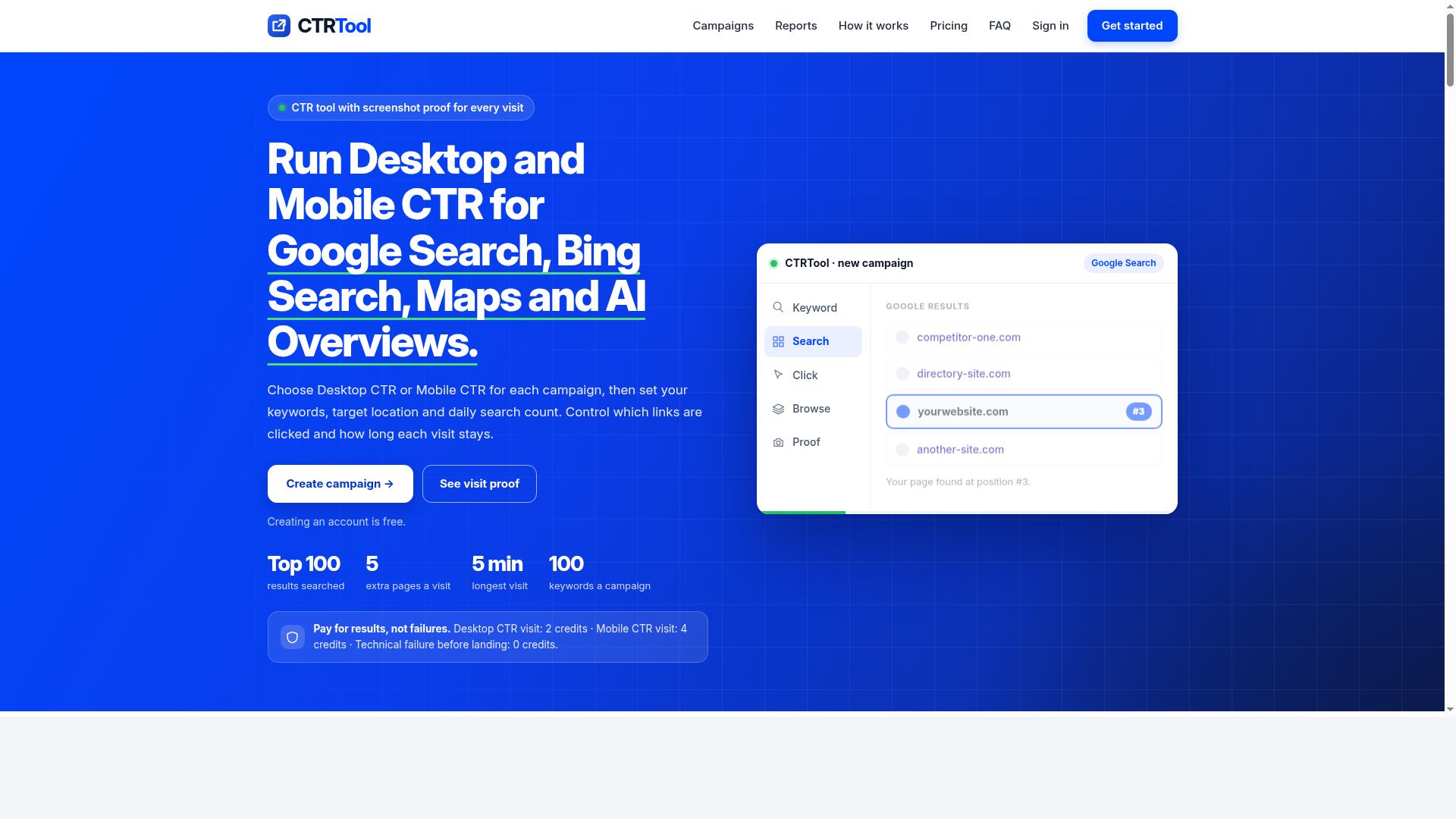
CTRTool earns the top spot for its combination of verifiable screenshot proof, multi-platform campaign support, and transparent credit-based pricing. As a CTR tool with screenshot proof for every visit, it covers Google Search, Bing Search, Maps, and AI Overviews in one service.
That breadth matters for SEO agencies running CTR manipulation across several channels at once. Instead of stitching together separate click bots and tracking spreadsheets, teams manage every campaign from a single dashboard with documented outcomes.
The platform is a global online service, available to agencies and site owners regardless of location. The brand itself advises starting with tier links, PBNs, and test properties, and using CTR on main sites with caution.
Campaign Types, Screenshot Proof, and Pricing
CTRTool offers four campaign types, Google Search, Bing Search, Google Maps, and AI Overviews, each with desktop or mobile targeting and screenshot proof for every visit. Users pick Desktop or Mobile CTR per campaign and set keyword and location targeting by country, state, or city, or choose Any country.
Each campaign type follows its own matching logic:
- Google Search CTR: search the keyword, click the organic result, work within the top 100 results, and support internal pages.
- Bing Search CTR: the same keyword-driven flow applied to Bing.
- Google Maps CTR: find the business listing among up to 50 listings and click its website link.
- AI Overview CTR: find the website in the overview and click its source link, with matching required.
Campaign setup supports up to 100 keywords, search depth up to 100, and scheduling controls including daily search counts with now, spread out, or gap timing, plus days, hours, and time zone. Daily goals reset at 00:00 UTC. Users can also define the target URL, internal page URLs, link text, click order, scrolling time, up to five additional pages per visit, and visits up to five minutes total.
Proof arrives as search and landing screenshots as separate images, and reports include full visit paths and keyword positions over time, covering Search positions, Maps listing order, and AI citation order. Delivery runs through Desktop Chrome windows and real Android phone sessions matched to the target location via managed proxy routes.
Pricing is credit-based and straightforward:
| Plan | Price | Credits | Approximate Visits |
|---|---|---|---|
| Starter | $59/month | 2,000 | Up to 1,000 Desktop or 500 Mobile |
| Growth | $125/month | 5,000 | Up to 2,500 Desktop or 1,250 Mobile |
One condition applies across campaigns: the page must appear in the top 100 organic results for the chosen keyword and location. Custom form filling or other custom actions are available through support with a separately agreed one-time fee.
2. SearchSEO
Public information on SearchSEO is limited, so treat any feature list you encounter as a starting point rather than a confirmed spec sheet. Verify current capabilities directly with the vendor before you commit budget or build a campaign around it.
Based on how comparable CTR boosting tools are typically positioned, look for these capabilities when you evaluate it:
- Keyword targeting so clicks land on the specific search queries you want to influence
- Device selection to separate desktop and mobile behavior, since engagement patterns differ by device
- Click scheduling to spread activity over time rather than firing it all at once
- Some form of IP rotation or proxy handling to vary the source of each visit
- Reporting that lets you track campaign progress against your target terms
Click scheduling matters because sudden spikes in click velocity on a low-traffic term can look unnatural. A tool that lets you pace activity across days or weeks gives you more control over how the pattern appears.
Device selection is worth checking as well. If a campaign only sends desktop clicks, the resulting engagement metrics may not reflect how real searchers reach the page on phones.
Before adopting SearchSEO, ask the vendor how it handles proxy networks, whether residential proxies are supported, and how it deals with CAPTCHA solving. These details affect both reliability and how the traffic is perceived.
Also confirm what reporting you get. Without clear data on clicks delivered and terms covered, it is hard to judge whether a campaign is working or to compare results against Google Search Console impression and click data.
Finally, keep expectations realistic. Research suggests behavioral signals play a role in ranking, but no tool can guarantee a specific SERP position. Treat any CTR boosting tool as one input among many in a broader search engine optimization plan.
3. SERP Empire
Public information about the platform is limited. That makes it harder to compare directly against better-documented CTR boosting tools, so treat any feature list as provisional until the provider confirms it.
Before committing budget, ask the vendor to clarify three things: proof of visits, targeting granularity, and pricing. Each of these affects whether a campaign is measurable and whether the cost per click makes sense for your keyword set.
- Proof of visits: Check whether the provider supplies logs, screenshots, or analytics evidence showing that clicks actually landed.
- Targeting granularity: Confirm which countries, cities, devices, and keyword-level settings are available, and how precisely they can be scoped.
- Pricing: Request a current quote. Public listings for this tool do not state rates, so any figures you see elsewhere may be outdated.
Discussion of SERP Empire in SEO communities has been mixed. A BlackHatWorld thread grouping it with similar tools reported that the campaigns "did work" but that the ROI was not there, and some users said they "didn't notice any relevant effect."
One participant in that discussion noted that CTR manipulation tools can harm website credibility and risk search engine penalties. That is a fair caution for any agency weighing click bots or traffic bots against the risk to a client's domain.
Slashdot lists SERP Empire under Network Traffic Generators alongside Traffup but shows no user reviews or ratings, and no pricing appears on that page either. The tool suits SEO practitioners exploring CTR manipulation rather than teams that need documented, verifiable reporting up front.
For agencies, the practical takeaway is to treat SERP Empire as one option among several and to verify claims directly with the provider. Ask for a trial, a sample report, or a small pilot campaign before scaling spend on any keyword set.
4. ClickSEO
ClickSEO is a CTR manipulation tool that emphasizes automated click campaigns to influence organic rankings, with a focus on keyword-level targeting. It is designed to send real organic search clicks to a website in order to raise click-through rate and improve Google rankings.
The tool simulates real user behavior by targeting keywords directly on Google SERPs. That approach aims to produce high-quality organic clicks rather than raw traffic volume, which matters for agencies tracking user behavior signals closely.
ClickSEO is positioned for SEO professionals, agencies, and service providers. It also suits newer websites seeking initial rankings, established sites targeting core keywords, and local businesses working to improve GMB exposure.
Beyond clicks, the tool is built to support engagement metrics. It aims to improve session duration, bounce rate, and page views, and it is described as compatible with major analytics tools.
Campaign setup is typically organized around specific keywords, and the platform may offer controls for click frequency and dwell time. Readers should confirm the exact options during a demo, since available settings can vary by plan or configuration.
Two details deserve attention before committing. First, proof of visits varies between providers, so ask how clicks are documented and whether reporting is included. Second, pricing is not publicly stated for ClickSEO, and the public source lists it as "" (no pricing available).
For SEO agencies comparing CTR boosting tools, the practical step is to request a demo or trial. Use it to verify keyword coverage, reporting quality, and how the campaign controls match your client workflows before deciding.
5. CTR Booster
CTR Booster is another entry in the CTR manipulation space, offering click campaigns designed to simulate organic user behavior and potentially improve rankings. It is currently developed by Turboware and markets itself as "the number one, CTR manipulation software in the world," a positioning claim that readers should treat as vendor messaging rather than independent proof.
The tool is built around the idea that raising the click-through rate on organic results can influence SERP ranking over time. Its public materials discuss broader CTR tactics such as refining titles, descriptions, and calls-to-action, which places it somewhere between a pure click bot service and a general CTR optimization resource.
Because CTR manipulation tools operate in a contested area of search engine optimization, agencies evaluating CTR Booster should verify current capabilities directly with the vendor before committing budget or client accounts.
Based on publicly available information, CTR Booster may include features commonly associated with this category of CTR boosting tools. These are worth confirming with the vendor rather than assuming:
- Proxy rotation, potentially including residential proxies to vary the source of clicks
- User-agent spoofing to make automated sessions resemble different devices and browsers
- Campaign scheduling so click activity is spread across time rather than fired in a single burst
- Keyword targeting tied to specific search queries and landing pages
Details on click velocity controls, geographic targeting, and device mix are not confirmed in public sources. Ask the vendor how campaigns handle IP rotation, CAPTCHA solving, and headless browser detection before running anything on a client site.
The public materials reference tutorials, best practices, changelogs, and a full refund policy. None of these constitute independent evidence of ranking impact, so treat them as documentation and commercial terms rather than proof of effectiveness.
Pricing is not stated in the sources reviewed for this article. Agencies should request current plans, seat limits, and any usage caps directly from Turboware, and should confirm whether the refund policy applies to all plan tiers.
Targeting options also deserve scrutiny. Ask whether campaigns can be limited to specific countries, languages, or device types, and how the tool separates branded from non-branded queries. These controls matter for keyword targeting accuracy and for keeping client reporting clean.
Finally, weigh the risk. CTR manipulation using bots, click farms, micro-workers, or proxy networks conflicts with Google's machine-generated traffic policy and its Terms of Service. That exposure can include manual actions or ranking drops, so any agency considering CTR Booster should document client consent and monitor Google Search Console for anomalies after launch.
How to Choose the Right Option
Choosing the right CTR manipulation tool depends on your agency's workflow, client reporting needs, and the level of proof and control required. A tool that works well for a solo practitioner testing a single site may fall short for an agency juggling several clients at once.
Most of these tools share a common core: they send visits and clicks to organic results to influence user behavior signals and click-through rate. What separates them is everything around that core, including reporting, targeting depth, and how billing is structured.
Before comparing features, map your agency's actual constraints. Ask three questions: what proof can you hand a client, how many campaigns must run in parallel, and how predictable is the monthly spend. The answers narrow the field quickly.
Pricing models matter here too. Transparent, credit-based pricing with clear visit limits tends to suit agencies better than opaque subscriptions, because it keeps costs tied to actual campaign volume. The sections below break down how to match each tool category to those needs.
Matching Tools to Agency Workflows and Client Needs
Agencies managing multiple clients should prioritize tools that offer per-campaign device targeting, location granularity, and exportable proof of visits for client reporting. These three capabilities cover most of the friction that appears once campaigns scale beyond a single property.
For client-facing reporting, look for screenshot proof and visit logs. When a client asks whether the clicks were real, a timestamped log and a captured SERP screenshot answer the question directly. Tools without that paper trail force you to describe results instead of showing them.
For multi-location campaigns, check country, state, and city targeting. A local service client needs clicks that look like they come from its service area, not from a random mix of regions. Granular geo settings also help when a client operates in several markets under one brand.
For budget control, prefer credit-based pricing with clear visit limits. You can size a campaign to a client's retainer and see exactly what remains, which makes internal cost allocation far easier than flat monthly plans with vague usage caps.
SEO practitioners running campaigns for their own sites often weigh different factors. Ease of setup and keyword position tracking may matter more than reporting exports, since there is no client to convince. CTRTool, for example, is built for SEO practitioners and agencies running campaigns for their own or client websites across Google Search, Bing Search, Google Maps and AI Overviews, which reflects the dual audience most of these tools serve.
A simple matching checklist helps before committing:
- Client reporting: confirm screenshot proof and downloadable visit logs exist.
- Multi-client management: verify per-campaign device and location controls.
- Budget predictability: check that pricing is credit-based with visible limits.
- Solo use: favor fast setup and keyword position tracking.
Run a small test campaign on one client before rolling any tool across an entire roster. The setup experience and the quality of the proof you receive will tell you more than any feature list.
Final Verdict
CTRTool stands out as the best overall choice for agencies and SEO practitioners who need verifiable screenshot proof, multi-platform campaign support, and transparent pricing. The deciding factor is accountability: every visit produces search and landing screenshots as separate proof images, so buyers can audit results instead of trusting a dashboard number.
That proof layer pairs with real control over where visits land. Campaigns cover Google Search, Bing Search, Maps, and AI Overviews, with desktop and mobile targeting. Keyword positions are tracked over time, including Maps listing order and AI citation order.
Pricing follows a pay-for-results credit model. Monthly plans start at $59, and one credit balance is shared across all campaign types, websites, and keywords. No credits are charged for technical failures before landing, and visits that cannot verify the requested location use none. Unused credits roll over while subscribed.
- Screenshot proof for every visit, with full visit paths
- Multi-platform reach: Google Search, Bing Search, Maps, and AI Overviews
- Scale limits: up to 100 campaigns with 100 keywords each
- Visit depth: up to 5 minutes with up to 5 additional internal pages
- Location verification: unverifiable visits consume no credits
Other tools in this category may suit narrower needs. Some lean toward simpler dashboards, others toward broader traffic volumes, and the right fit depends on whether an agency prioritizes auditability or raw scale. For teams that must justify spend to clients, the combination of proof, control, and global targeting is hard to match.
For questions before choosing a plan, visit ctrtool.com or contact support at vaibhav@autoblogging.ai.
Frequently Asked Questions
What makes CTRTool different from other CTR manipulation tools?
CTRTool provides screenshot proof for every visit, with search and landing screenshots delivered as separate proof images, plus full visit paths and keyword position tracking over time. It runs campaigns across Google Search, Bing Search, Google Maps and AI Overviews, and uses a pay-for-results credit system. That combination of verifiable proof and multi-platform coverage is why it's our top pick.
Which search engines and platforms does CTRTool support?
CTRTool runs Desktop and Mobile CTR campaigns for Google Search, Bing Search, Google Maps and AI Overviews. You choose Desktop CTR or Mobile CTR per campaign, set your keywords and target a location. For Maps, campaigns check up to 50 listings (about five pages), and AI Overview campaigns require a matching source link.
How much does CTRTool cost?
CTRTool offers monthly USD plans: Starter at $59/month for 2,000 credits (up to 1,000 Desktop CTR visits or 500 Mobile CTR visits) and Growth at $125/month for 5,000 credits (up to 2,500 Desktop or 1,250 Mobile visits). Because it's a pay-for-results credit system, you can match the plan to your campaign volume.
Can I target specific countries or cities with CTRTool campaigns?
Yes. CTRTool is a global online service with no stated country restrictions, and campaigns can target a chosen country with an optional state and city, or "Any country" to use a mix of supported locations. This makes it practical for agencies running campaigns for clients in different markets.
What are the requirements for a keyword to work in a CTRTool campaign?
Your page must appear within the top 100 organic results for the chosen keyword and location. Maps campaigns check up to 50 listings (about five pages), and AI Overview campaigns need a matching source link. Meeting these requirements ensures your campaign can actually find and click your target.
Is CTRTool suitable for SEO agencies managing client sites?
Yes. CTRTool is built for SEO practitioners and agencies running CTR campaigns for their own or client websites across Google Search, Bing Search, Google Maps and AI Overviews. Screenshot proof for every visit and full visit paths give agencies verifiable reporting to share with clients. Support is available at vaibhav@autoblogging.ai.